In the world of healthcare compliance, every password is more than a key — it’s a safeguard for patient privacy. Passwords protect access to your email, electronic health records (EHR), billing platforms, and internal files. When one password is weak or reused, it can unlock multiple systems and expose sensitive patient data.
Cybercriminals often look for the easiest way in. And for many organizations, that “way in” starts with a single employee password that’s been reused, shared, or left unchanged for too long. The good news? With the right password habits, these risks are entirely preventable.
One Weak Password Can Open Every Door: The Risk of Credential Reuse
Every account you use is a separate lock. If you reuse the same key or pick a flimsy one, it only takes a single compromise to unlock everything. This isn't theory. A U.S. healthcare provider paid six figures in HIPAA penalties after stolen employee credentials exposed thousands of records. Investigators found two preventable issues: password reuse and no multi-factor authentication (MFA).
Password reuse is one of the biggest security risks in healthcare organizations. When one site or account is breached, attackers often test those same credentials on other systems—a tactic known as credential stuffing. If you use the same password for your email, EHR, and HR system, one compromised account could expose them all.
HIPAA Security Rule reminder: The Access Control requirement (§164.312(a)) mandates unique user identification and secure authentication for all individuals accessing electronic protected health information (ePHI). Strong passwords are step one in protecting patients, your organization, and your reputation. But let us look at one more thing.
In 2025, a massive dump of 183 million stolen email-password pairs hit the open web. This dataset was a compilation of stolen credentials from years of malware infections, phishing campaigns, and older data breaches, with millions being brand-new to breach trackers. Most of these credentials were harvested by “infostealer” malware on personal devices and then reused for work logins through credential stuffing. Could Yours Be There?
For your peace of mind we recommend that you check your email on the official site for this newly added dataset:
If you appear in a breach, change that password and turn on MFA immediately. The faster you respond, the better you protect your identity. Regardless, we recommend five essential steps to protect your password and security.
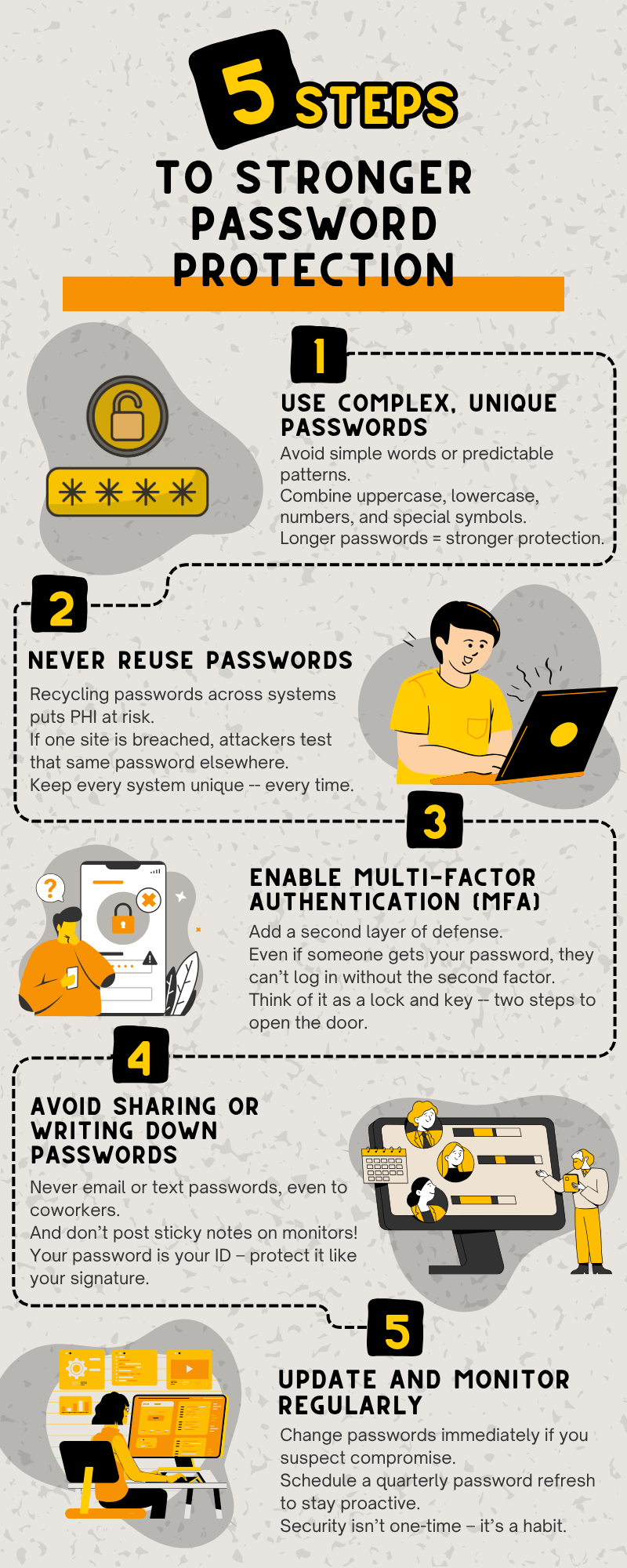
1. Use Complex, Unique Passwords
Avoid simple or predictable patterns like “Welcome123” or “Clinic2024.” These are among the first passwords attackers try. Instead, create complex passwords using a combination of:
- Uppercase and lowercase letters
- Numbers and special characters
- Unrelated words or phrases
A simple rule: the longer, the better. Passwords with at least 12 characters are exponentially harder to crack. Consider using a passphrase that’s easy for you to remember but hard for others to guess, such as “Sunny!DaysMake$StrongCare”.
Complex passwords not only strengthen your defense but also align with HIPAA’s requirement for secure access controls to systems handling ePHI.
2. Never Reuse Passwords
Password reuse is one of the biggest security risks in healthcare organizations. When one site or account is breached, attackers often test those same credentials on other systems — a tactic known as credential stuffing.
If you use the same password for your email, EHR, and HR system, one compromised account could expose them all.
To prevent this:
- Create unique passwords for every account or system.
- Use a password manager to store and manage them securely.
Remember: Every system deserves its own key.
3. Enable Multi-Factor Authentication (MFA)
Even the strongest password can be stolen through phishing or malware. Multi-factor authentication (MFA) adds an extra layer of defense — requiring not just something you know (your password), but also something you have (like a code sent to your phone) or something you are (like a fingerprint).
Think of MFA as a two-step lock system: even if someone guesses your password, they can’t get in without the second key.
Healthcare organizations should enable MFA wherever possible, especially for systems that handle ePHI, email accounts, and remote access tools. Doing so directly supports HIPAA’s technical safeguard for verifying user identity and reducing unauthorized access risks.
4. Avoid Sharing or Writing Down Passwords
It might seem harmless to email a coworker your login “just this once,” or to keep a sticky note with your password on your monitor. But both are serious security vulnerabilities.
Your password is your personal identifier — treat it like your signature. If you need to grant temporary access, follow your organization’s approved procedures or request authorized user credentials instead of sharing your own.
Keep in mind: once a password is shared, it’s no longer secure — or compliant.
5. Update and Monitor Regularly
Strong passwords aren’t “set it and forget it.” They require ongoing attention. Change your password immediately if you suspect any compromise, such as unexpected login alerts, failed login attempts, or unusual system behavior.
Proactively schedule password updates every three to six months. Regularly review your accounts and report any suspicious activity to your IT or compliance team right away.
Security isn’t a one-time task — it’s a continuous habit. Consistent vigilance builds a stronger, more compliant organization.
Home Office Hijinks: Personal Devices, Real Liability
Picture this: you use the same password for a retail account and your work email on a personal laptop. The retailer is breached. Attackers try the same combo on your inbox and get in. Suddenly, PHI is at risk because a “harmless” personal password became a master key. Your home is not a HIPAA-free zone. Treat your home office and personal devices like an extension of the office.
Your HIPAA Security Survival Kit
Protecting your online life starts with consistent action.
- Check your email on Have I Been Pwned.
- Update weak or reused passwords today.
- Enable MFA on all critical accounts.
- Slow down on links and attachments; Phishing is still the top threat.
- Keep devices patched and antivirus active.
- Lock your screen every time you step away.
- Secure home Wi-Fi and don’t share access with strangers.
- Report lost devices or suspicious activity right away.
The HIPAA Connection: Access Control and Accountability
HIPAA’s Security Rule (45 CFR §164.312(a)) emphasizes access control, requiring healthcare entities to assign unique user IDs and implement technical safeguards that prevent unauthorized access to ePHI. Strong password practices directly support this standard.
Every secure password reduces the chance of unauthorized access, data breaches, and costly HIPAA penalties. Beyond compliance, it builds trust — with your patients, your colleagues, and your organization.
Final Takeaway
It takes only a minute to create a strong password — but recovering from a data breach can take months, cost thousands, and damage reputations.
Protect your patients. Protect your credentials. Start with a stronger password today.