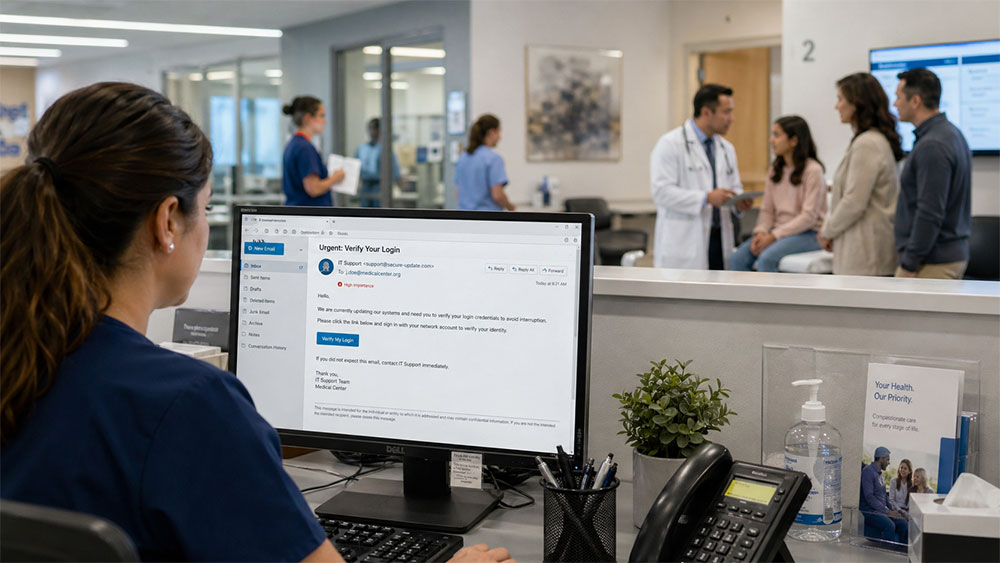
Malware has terrible manners.
It does not knock. It does not introduce itself. It does not politely announce, “Hello, I am here to disrupt your systems and create a compliance headache.”
It shows up pretending to be useful.
A helpful update. A routine file. A password prompt. A free tool. A document that looks just familiar enough.
That is the trick. Malware does not always look like trouble. Sometimes it looks like work.
In healthcare, that matters because work moves fast. Staff open files, send messages, check schedules, document care, process billing, and move between systems all day long. Malware knows how to hide inside that rhythm.
The danger is not only the click. The danger is what happens after the click: locked files, exposed information, interrupted workflows, investigation, documentation, and a team trying to figure out how far the problem has spread.
That is why malware prevention is not just about telling staff, “Be careful what you click.” That message is true, but it is not enough. The better question is this:
Can your organization spot malware early, contain it quickly, recover safely, and learn from what happened?
That is where practical HIPAA Security habits make the difference.
What Malware Really Means
Malware is short for malicious software. It is a broad term for harmful programs designed to damage systems, steal information, monitor activity, disrupt access, or compromise data.
It can include viruses, spyware, Trojans, ransomware, and other harmful tools. Some malware makes itself obvious right away. Other malware is quieter. It may sit in the background, collect information, watch activity, or wait for the right moment.
NIST, the National Institute of Standards and Technology, describes malware in terms of how it can compromise confidentiality, integrity, or availability. In plain English, malware can affect whether information stays private, remains accurate, and is available when staff need it.
For healthcare organizations, those three ideas are not abstract. If information is exposed, patients may be harmed. If information is changed or damaged, care and billing can be affected. If information is unavailable, operations can slow down or stop.
That is why malware belongs in the HIPAA Security conversation.
A clear example is the 2024 Change Healthcare ransomware attack, which showed how malware can move beyond one organization and disrupt the larger healthcare system. Change Healthcare was not just another vendor. It supported claims processing, payment functions, pharmacy transactions, eligibility checks, prior authorizations, electronic prescribing, and other administrative workflows that many providers rely on every day. When the incident forced systems offline, the impact was felt by physician practices, hospitals, pharmacies, billing teams, and patients who depended on those systems to keep care and payment moving. The lesson is simple: malware risk is also operational risk, vendor risk, cash-flow risk, patient-access risk, and continuity-of-care risk.
The Change Healthcare incident also showed why a malware event can become much more than an IT problem. Some providers struggled to submit claims, verify coverage, obtain authorizations, process prescriptions, or maintain normal cash flow while workarounds were put in place. For smaller practices, even a temporary interruption in claims and payments can create immediate financial pressure. For patients, delays in prescriptions, authorizations, or administrative processing can quickly become access-to-care concerns. That is the reality healthcare organizations must plan for: one compromised system, especially a major business associate or clearinghouse, can create consequences across many organizations that never clicked on the original malicious file.
Why Healthcare Needs to Take Malware Seriously
Healthcare systems hold information cybercriminals want: patient names, dates of birth, medical histories, insurance details, diagnoses, medications, billing records, and sometimes employee or financial information.
Healthcare also depends on access. Clinics, billing offices, labs, imaging services, and administrative teams need systems to work. When malware interrupts that access, it does not simply inconvenience one computer. It can affect scheduling, documentation, communication, billing, and patient service.
Ransomware is one of the most disruptive forms of malware because it can deny access to data, often by encrypting it until payment is demanded. In healthcare, that may trigger downtime procedures, internal investigation, documentation, and questions about whether ePHI was involved.
A malware event can force leadership to ask: What systems were affected? Was ePHI involved? Was the issue contained quickly? Were backups available and usable? Was the response documented clearly?
Those questions are easier to answer when the organization has prepared before the problem happens.
That reality became clear during Ascension’s 2024 cyber event, which disrupted clinical operations across parts of its health system. Public reporting described offline records, postponed tests, ambulance diversions, and staff relying on manual processes. When availability is interrupted, the issue is no longer only technical; it becomes a patient-care, staffing, communication, and documentation challenge.
The Many Costumes Malware Can Wear
One reason malware works is that it does not always arrive looking suspicious.
It may show up as a “secure document.” It may appear as a delivery notice. It may look like a password reset. It may pretend to be a software update. It may hide inside a file-sharing link. It may come through an unapproved download that seemed harmless at the time.
That is why staff training needs to sound like real life, not like a technical manual.
A billing team may receive an attachment that appears to be from a payer. A front-desk employee may see a browser pop-up claiming an update is required. A manager may receive a “shared document” link asking for a password. A team member may download a free file converter because a document will not open.
None of these situations automatically looks dramatic. That is exactly why they deserve a pause.
The Practical Malware Playbook
A malware playbook does not need to be complicated. The more practical it is, the better.
Pause when something feels unexpected.
Before opening a file, clicking a link, or accepting a prompt, ask: Was I expecting this? Does the sender look right? Is the message rushing me? Can I verify this another way?
Verify through a trusted route.
Malware often tries to control where the user goes next. A fake message provides a link. A fake update provides a button. A fake login prompt provides a place to type credentials. The safer habit is to step outside the message. Go directly to the official website, call using a known number, or ask the appropriate internal contact.
Change Healthcare also reinforced why organizations cannot treat every login prompt as routine. Public reporting from congressional testimony stated that attackers used compromised credentials and accessed a remote-access portal that did not have multifactor authentication. That detail matters because the first visible warning sign in a healthcare organization may not be a dramatic ransom note. It may be an unexpected password prompt, an unusual remote-access login, a strange verification request, or a system behavior that staff are tempted to ignore because they are busy. A suspicious password prompt, unexpected login request, or unusual remote-access activity should be verified outside the message or prompt before anyone proceeds.
The incident also became one of the most significant healthcare data events in U.S. history, with later public reporting tying it to approximately 192.7 million affected individuals. That number matters because it shows how quickly a cybersecurity incident can turn into a HIPAA, privacy, patient trust, vendor oversight, and breach-notification issue. For a healthcare organization, the takeaway is not only to ask whether its own systems are protected, but also whether its key vendors have the safeguards, reporting process, backup plans, and communication expectations needed when something goes wrong.
Use approved tools only.
Unapproved tools often enter the workplace through good intentions. Someone wants to open a file, convert a document, or move faster. The intention may be practical, but the risk is still real. Free tools, file converters, browser extensions, and unknown apps may collect information, introduce malware, or create security gaps.
Watch for strange behavior.
Malware may show itself through strange pop-ups, sudden slowness, files that will not open, missing or renamed files, unfamiliar login prompts, or programs opening on their own. The right response is not to work around the problem. The right response is to report it quickly.
Report fast, even if you are not sure.
People sometimes stay quiet because they feel embarrassed or hope nothing happened. Malware loves that silence. A quick report can help the right team contain the problem before it spreads.
What Managers Should Check This Month
Managers do not need to become malware analysts, but they should know whether the organization’s process works in real life.
This month, ask:
- Do staff know what malware can look like?
- Are approved tools and downloads clearly identified?
- Do staff know who to contact after a suspicious click?
- Are updates and backups handled consistently?
- Are near misses documented and used for learning?
This is not theoretical. The 2017 WannaCry attack against the United Kingdom’s National Health Service remains one of the clearest examples of why updates matter. The attack affected many NHS organizations, disrupted care, and contributed to thousands of cancelled appointments. The basic lesson still applies today: security patches, supported systems, reliable backups, and tested downtime procedures are not “IT extras.” They are part of keeping healthcare available.
A policy that no one remembers will not help much during a real incident. A reporting process that staff are afraid to use will not work quickly. A backup that has never been tested may not provide the confidence leadership expects.
The paper plan and the real workflow need to match.
In practice, a tabletop exercise can reveal gaps before a real event does. For example, a clinic may believe staff know what to do after a suspicious click, but when asked to walk through the steps, no one is sure whether to call IT, compliance, the office manager, or the vendor. That gap is fixable before an incident, but it becomes expensive during one.
The Bigger Lesson
Malware does not need drama.
It does not need a movie-style hacker scene. It does not need a dramatic warning screen. Sometimes it only needs a normal workday, a familiar-looking message, and one rushed click.
That is why malware prevention depends on habits that hold up when people are busy.
Pause before opening. Verify before trusting. Use approved tools. Follow update procedures. Report strange behavior quickly. Document what happened. Learn from near misses.
In healthcare, these habits protect more than devices. They protect access to care, patient information, staff workflows, and organizational trust.
The small pause matters.
It may be the thing that keeps malware from turning one ordinary workday into a much larger problem.
How Structured Support Helps
HIPAA security shouldn't be a burden, but a blueprint for resilient practice. EPICompliance provides a centralized platform for managing training, policy templates, and automated task lists, keeping your team organized and audit-ready. When you need to align these tools with your specific operations, Taino Consultants provides expert guidance to help you navigate the Security Risk Assessment (SRA) process and right-size your risk management plan.
Take the next step
Current Users: Log in to review your monthly security reminders, compliance tasks, and ensure your documentation reflects your current workflows.
New to Us? Discover how our combined tools and guidance reduce uncertainty and build a culture of compliance.
Visit EPICompliance • Consult with Taino